

Every EdTech tool your school uses. Approved, assessed and trusted.
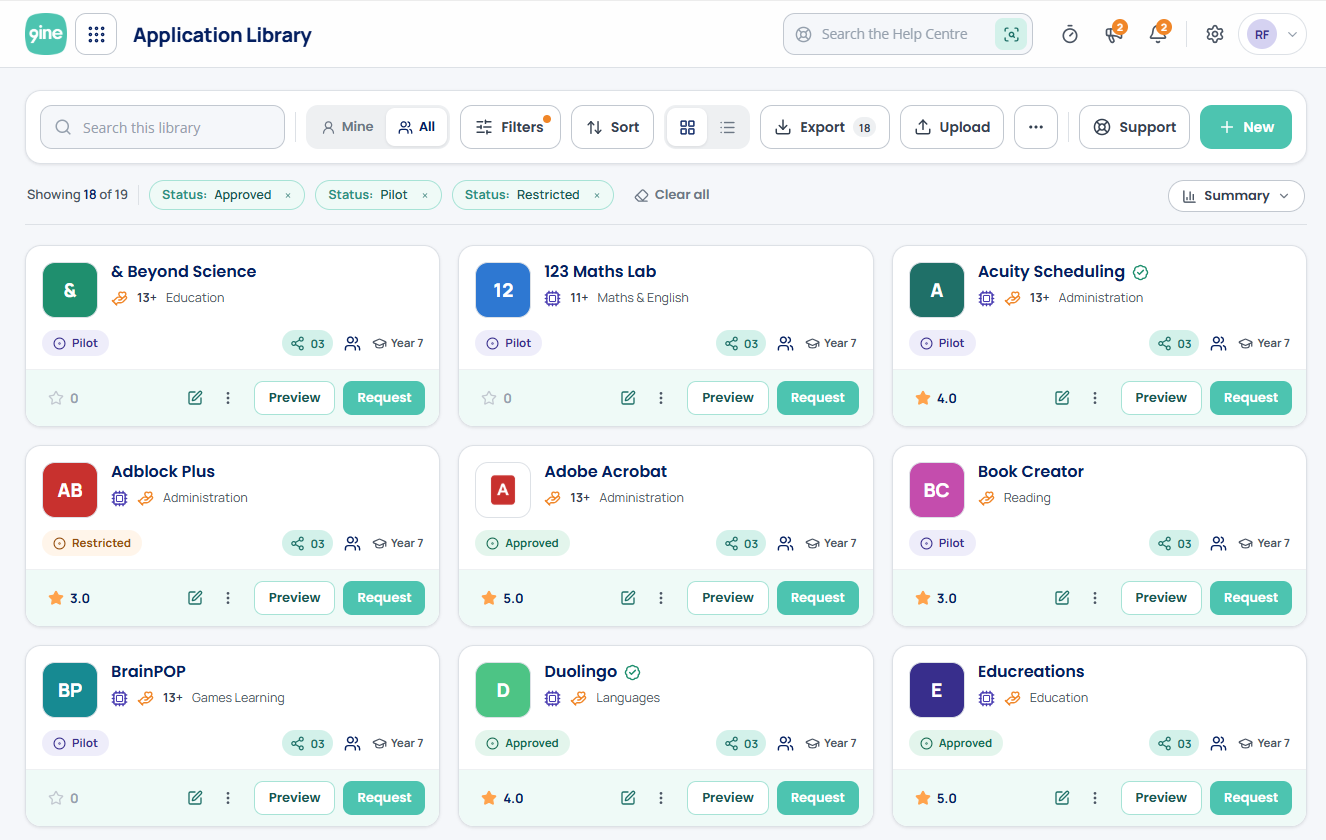
One place for every EdTech decision your school makes
Application is the EdTech governance module of the 9ine platform. It replaces informal approval processes with a single, searchable inventory, giving teachers the information they need to use tools safely, and giving leadership the evidence they need to demonstrate accountability.

A searchable EdTech inventory
Every approved application in one place — filtered by subject, age group, AI use, approval status, platform type and safeguarding risk. Staff always know what's available, what's approved and how to access it.

Structured approval workflows
Replace email-based requests with a governed process that automatically routes new tool requests through vendor assessment, DPIA screening and governance sign-off — with a full timestamped audit trail of every decision.

Risk and compliance at a glance
AI risk categorisation, safeguarding summaries and privacy status appear on every application card — so staff always know what they're working with before they use a tool with pupils.
Built for governance. Designed for teachers.
A single source of truth for every EdTech tool in your school
Centralise your entire application estate in one searchable, filtered inventory. Every application card shows approval status, AI risk categorisation, safeguarding considerations, privacy status, age suitability, how-to videos and peer reviews from other staff — giving teachers the confidence to use tools appropriately and leaders the evidence to show EdTech is governed systematically.
Application Library
Searchable EdTech inventory
Application Requests
Structured approval workflow
Application Directory
Discovery and integration
AI Risk Labelling
AI governance built in
Vendor Integration
Connected to Vendor Management
Implementation
Live within three months
Centralise every approved application in one place
Every tool in your school estate; searchable, filtered and categorised. Staff browse by subject, age group, AI use, approval status and safeguarding risk level. Application cards show approval badges (Approved, Pilot, Restricted), AI risk labels, safeguarding summaries, privacy status, age suitability, how-to videos and peer reviews from colleagues.
Replace email requests with a governed approval process
When a teacher wants to introduce a new tool, Application Requests routes the submission through vendor assessment, DPIA screening and governance sign-off; automatically. Every decision is timestamped and recorded, creating a complete audit trail that leadership can show to governors, inspectors or the ICO.
Find and add new applications with confidence
Application Directory is a curated discovery tool for finding new EdTech. Schools can review independent vendor assessments and add approved tools directly to the Application Library, streamlining how organisations discover, evaluate and integrate new applications into their governed estate.
Know which tools use AI and how they've been assessed
Every application in the library carries an AI risk categorisation label, so staff can immediately see which tools use AI features and how they've been assessed. Critical for schools navigating DfE and ICO guidance on AI in education, and for demonstrating to governors that AI-enabled tools are subject to appropriate review before use.
Vendor risk intelligence on every application card
Application connects directly to the 9ine Vendor Management module. Independent vendor assessment data surfaces automatically on application cards, so EdTech decisions are always informed by current, objective risk intelligence rather than the vendor's own claims.
From consultation to live library in three months — with a consultant alongside you throughout
Application is built to your school, not copied from another. 9ine's concierge onboarding follows a structured eight-step process: Welcome Email and account setup (Day 1) → Initial Consultation to set objectives (Day 3) → Prioritisation of your top 50 applications (Day 7) → 9ine Development of your first build (Day 14) → Collaborative Review with your school (Day 21) → Initial Build completed and ready for review (Day 30) → Fine-Tuning with key staff (Month 2) → Finalisation and Launch with ongoing weekly support (Month 3).
Ready to bring order to your EdTech estate?
Speak with a 9ine consultant to see how Application fits your school's current setup — and what it would take to go live.
Book a conversationDesigned for every role that touches EdTech decisions
Application serves the whole school — from the teacher looking for the right tool, to the senior leader who needs to demonstrate that every EdTech decision has been properly governed.

Demonstrate governance to governors and inspectors
Get a clear picture of every tool used across the school, what it costs, and whether each has been properly assessed — with a structured, evidenceable record to present to governors, inspectors and regulators with confidence.

Replace email requests with a structured approval process
A governed application approval workflow that routes every new tool request through assessment and sign-off — with a full audit trail of decisions and direct connection to independent vendor risk intelligence.

Privacy and GDPR status for every application — automatically
At-a-glance privacy status for every tool in the estate. When a new application is requested, DPIA screening is triggered automatically through the Privacy module — keeping data protection governance directly connected to EdTech adoption.

Safeguarding considerations visible on every application card
Safeguarding risk data from vendor assessment surfaces directly on each application card. Filter the entire library by safeguarding risk level to identify tools that need closer review — before they're used with pupils.
A trusted, searchable reference for every approved tool
Find approved EdTech quickly, read peer reviews from colleagues, access how-to videos and guides, and request anything new through a simple, structured workflow. No more uncertainty about whether a tool is approved or safe to use.
Application vs. the way most schools manage EdTech today
Most schools manage EdTech informally — emails, spreadsheets and word of mouth. Application replaces that with a governed, evidenceable process built for inspection, accountability and scale.
Built for the scrutiny schools face
9ine has supported schools with EdTech governance since 2009. Application reflects over 15 years of understanding what inspectors, governors and regulators ask, and what evidence schools need to provide.

Evidence-ready audit trail
Every application decision is timestamped and recorded. When an inspector or governor asks how your school governs EdTech, you have a complete, structured answer — not a spreadsheet you've just updated.

Independent vendor risk intelligence
Application cards connect to 9ine's independent vendor assessment data — not the vendor's own claims. Schools get an objective view of every tool's risk profile, feeding directly into EdTech decisions.

Safeguarding and AI governance built in
Safeguarding considerations and AI risk labels surface automatically on every card. No tool enters your estate without appropriate review — and the evidence of that review is always available.

Built to your school, not copied from another
9ine's concierge onboarding service builds your Application Library specifically for your school — your platforms, your categorisation, your processes. No two libraries are the same.
"The team at 9ine have been instrumental in supporting us in our journey toward stronger data governance and EdTech accountability across our school."
"We began to work with 9ine for our Digital Privacy Management. We quickly expanded to their Cybersecurity services due to their professionalism and depth of expertise."
"They felt like an extension of our IT support team and were never judgemental. The depth of knowledge they brought made an immediate difference to how we approach digital governance."
Application is stronger as part of the wider 9ine platform
Connect Application to the modules that govern vendor risk, contracts, data protection and broader school governance — creating a complete, joined-up picture of your digital estate.
Vendor Management
Independent vendor risk assessments feed directly into application cards — giving every EdTech decision an objective risk foundation.
Contract Module
Connect application management with contract costs, renewal dates and notice periods — completing the cost control picture.

Privacy Module
Application requests trigger DPIA screening and connect to Records of Processing — keeping data protection governance joined to EdTech adoption.

Governance Module
Open risks and actions from your application review become trackable, assignable governance tasks — nothing falls through the cracks.
Common questions about Application Library
We already track our applications in a spreadsheet — why do we need this?
ow long does it take to go live — and what does the process look like?
Will teachers actually use it?
What if we don't have the budget right now?
Do we need other 9ine modules for this to work?
Explore related insights

From Prompt to Production: Why AI-Generated Code Still Needs Developers

The AI, Technology and Safeguarding Jigsaw Is Complete: The Academy Trust Handbook 2026 Requires Digital Risk Leadership

DfE EdTech procurement guidance: the Department is joining the dots for schools

KCSIE 2026 is confirmed: AI is now part of the safeguarding system
Ready to govern your EdTech with confidence?
Speak with a 9ine consultant to see Application in action — and understand what it would take to build a governed, evidenceable EdTech inventory for your school.